WhatsApp automation that delivers results
With mLabs Chat, you turn WhatsApp into a professional channel for service, relationship, and sales! All automatically and without needing to understand automation.
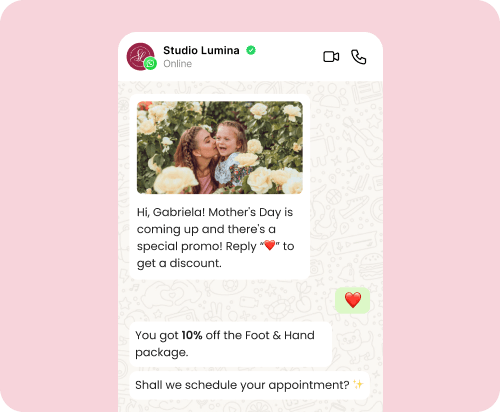
Send messages with purchase links, coupons, and offers
Every contact is a potential customer! Put the buying journey on autopilot and turn WhatsApp conversations into sales!
Send at the right moment:
- Purchase links
- Discount coupons
- Personalized offers
Simplify your marketing campaigns via WhatsApp
Take advantage of WhatsApp’s high message open rates to activate your contact base and generate more results with:
- Bulk messaging
- Promotional campaigns
- Notices, launches, and news
- Automatic feedback collection
Enhance service and build customer loyalty
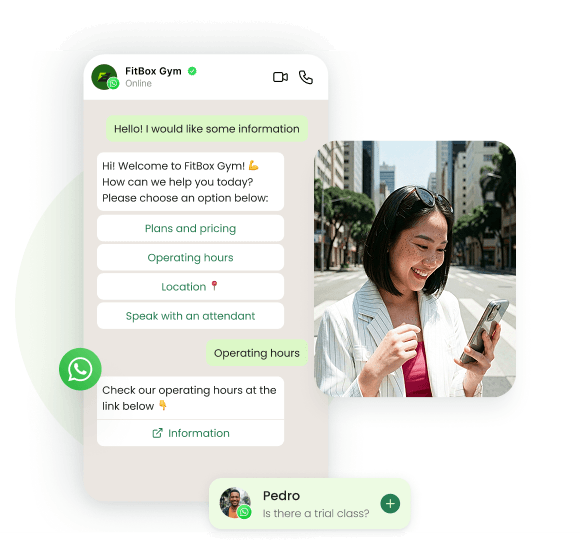
Use WhatsApp as a direct relationship channel. With mLabs Chat, customers get instant replies even outside business hours. Respond automatically with your brand’s tone:
- Frequently asked questions
- Initial requests
- Questions about products and services
Why automate WhatsApp with mLabs Chat?
More sales where your customer already is
Turn conversations into real sales opportunities.
Instant 24/7 responses
Serve your audience automatically, anytime.
More qualified leads
Identify interests and collect data before human service.
Bulk campaigns with high open rates
Send campaigns on WhatsApp and increase your message reach.
Scale service without growing your team
Automate repetitive service and
gain efficient scale.
Centralized operation on a single number
Manage service on one number with better operation control.
More sales where your customer already is
Turn conversations into real sales opportunities.
Instant 24/7 responses
Serve your audience automatically, anytime.
More qualified leads
Identify interests and collect data before human service.
Bulk campaigns with high open rates
Send campaigns on WhatsApp and increase your message reach.
Scale service without growing your team
Automate repetitive service and
gain efficient scale.
Centralized operation on a single number
Manage service on one number with better operation control.
Qualify leads before human service
Save your team’s time and effort with smart WhatsApp automation. Ask strategic questions to:
- Identify purchase intent
- Classify interest level
- Separate cold leads from potential buyers
- Forward only hot leads to the human team
Have multiple agents on a single WhatsApp number!
Centralize all service and sales operations on one WhatsApp number and get a complete view of conversations, even with multiple team members.
- Multiple agents on the same WhatsApp
- Centralized service history
- Assign conversations to new responders
FAQ
Is the cost of sending WhatsApp messages included in the mLabs Chat subscription?
No. Sending messages via WhatsApp incurs costs set by Meta and is not included in the mLabs Chat subscription.
These charges are billed directly by Meta to the company’s commercial account in Facebook Business Manager, using the payment method configured in that account.
In other words:
• mLabs Chat only charges for platform usage
• WhatsApp conversation costs are charged directly by Meta
You can check the updated prices on WhatsApp’s official calculator:
👉 https://business.whatsapp.com/products/platform-pricing?lang=en_US
Do I need a phone number to use WhatsApp on mLabs Chat?
Yes. To use WhatsApp in mLabs Chat, you need a valid phone number that will be connected to the WhatsApp Business Platform.
This number will be used to:
• send messages
• receive messages from customers
• run automations
• send campaigns
During setup, the number must be able to receive SMS or calls, as a verification code needs to be confirmed.
Can conversations be viewed and answered in the WhatsApp Business app?
It depends on the connection method used.
When the number is connected to the WhatsApp Business Platform, support usually happens within the connected tool, such as mLabs Chat.
In some cases, coexistence mode can be used, allowing you to keep using the WhatsApp Business app on your phone while automations run on the platform.
However, some app features may become unavailable after connection.
Can I use a phone number I already use on WhatsApp with mLabs Chat?
Yes. You can use a number already in use on WhatsApp or WhatsApp Business.
During the connection process, this number will be migrated to the WhatsApp Business Platform, enabling use in support and automation tools like mLabs Chat.
Depending on the connection method, the WhatsApp app on the phone may stop working for this number.
Do I need to verify on Facebook Business Manager?
Yes. To use WhatsApp in mLabs Chat, the company must have a commercial account set up in Meta Business Manager and complete the business verification process.
This verification is required by Meta to confirm that companies using the WhatsApp Business Platform are legitimate businesses.
My WhatsApp number is already connected to another provider. Can I migrate it to mLabs Chat?
Yes, but first you need to disconnect the number from the current tool.
A WhatsApp Business number can only be connected to one platform at a time. If it is active on another provider or support tool, connection to mLabs Chat will not be allowed.
Once the number is released by the previous provider, it can be connected normally to mLabs Chat.
Customer service, lead qualification, and sales.
All automated.
24 hours a day, 7 days a week.
Try mLabs Chat free for 7 days.
No credit card required. We don’t do SPAM 😉